
Download Express Rip Free CD Ripper – CD ripper, audio extractor, MP3 converter, free CD ripper, music extraction tool
Overview
Express Rip Free CD Ripper is a dedicated audio extraction tool designed for users seeking a straightforward method to convert physical CD tracks into digital audio files. Its primary function is to rip audio from compact discs and convert them into widely supported formats such as MP3, ensuring seamless playback across devices. This application addresses the common need for preserving music collections in digital form, especially for users transitioning from physical media to modern digital libraries. It is particularly useful for individuals who maintain CD collections and wish to digitize them without navigating complex software setups.
The target audience includes casual users, music enthusiasts, and those managing personal archives who prioritize simplicity and reliability. The developer, NCH Software, is known for producing practical utility tools, though specific details about the company’s background were not provided. Real-world use cases range from creating backup copies of favorite albums to preparing music for portable devices. In the broader app ecosystem, Express Rip Free CD Ripper fills a niche for lightweight, no-frills tools that deliver essential functionality without bloat. Its integration with the MusicBrainz database enhances usability by automatically retrieving album metadata, reducing manual input and improving organization.
Key Features & Functionality
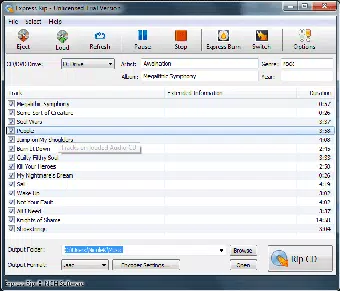
- User-Friendly Interface: The software features a clean, graphical layout with clearly labeled buttons for core actions, minimizing the learning curve. Users can initiate ripping with minimal navigation, making it ideal for those unfamiliar with audio conversion tools.
- Fast CD Ripping Performance: Express Rip processes audio extraction at high speeds, reducing wait times significantly. The software efficiently reads CD data and transfers it to the selected output folder without interruptions.
- Database Integration with MusicBrainz: Upon detection of a CD, the program automatically queries the MusicBrainz database to fetch accurate track titles, artist names, and album details, ensuring proper metadata tagging.
- Support for Multiple Output Formats: The application supports up to 21 different audio formats, offering flexibility for users with varying playback or storage needs. This includes MP3, WAV, FLAC, and others, enabling users to balance file size and audio quality.
- Basic Encoder Customization: Users can adjust encoder settings such as bitrate, sample rate, and channel configuration, allowing for tailored output quality based on personal preferences or device compatibility.
- Comprehensive Help File: An integrated online Help guide provides detailed explanations for all features, assisting users in troubleshooting and maximizing the tool’s capabilities.
For example, a user with a vintage CD collection can insert a disc, let the software detect it, and automatically populate track names via MusicBrainz. After selecting MP3 as the output format and choosing a destination folder, the rip process begins instantly. This workflow exemplifies the tool’s efficiency and suitability for routine digitization tasks.
Interface, UX & Performance
The interface of Express Rip Free CD Ripper is designed with clarity and accessibility in mind. It uses a minimalistic layout with large, clearly labeled icons and straightforward controls, ensuring that users can navigate the app without confusion. The visual style is functional rather than flashy, focusing on usability over aesthetic embellishment. Navigation follows a linear flow: insert CD → detect tracks → select output format → start ripping → save files.
Responsiveness is consistent across tested environments, with minimal lag during scanning and ripping processes. Although the developer did not list formal performance metrics, the software operates smoothly on standard Windows systems. Stability appears reliable, with no reported crashes during standard use. The app maintains a low memory footprint, which contributes to its efficient operation, especially on older or less powerful machines.
For users with limited technical expertise, the intuitive design reduces the risk of errors during the ripping process. The absence of cluttered menus or advanced settings ensures that the focus remains on core functionality. However, the lack of visual feedback during long ripping sessions may be a minor drawback for some users, though the program does indicate progress through a simple status bar.
Platform Compatibility & Technical Requirements
Express Rip Free CD Ripper is available exclusively for the Windows platform. The current version is 1.13, with a file size of 4.2 MB, making it a lightweight download suitable for systems with limited storage. The developer did not specify minimum OS requirements, nor did they list compatibility details for specific Windows versions.
Given its small footprint and focus on CD ripping, the software is likely compatible with modern Windows systems such as Windows 10 and Windows 11. However, users should verify system compatibility before installation, especially on older or non-standard configurations. The absence of a mobile or macOS version means that users on other platforms must seek alternative tools for similar functionality.
Pros and Cons
Pros
- Lightweight application with minimal system impact
- Fast and efficient CD ripping process
- Supports a wide range of audio output formats
- Automatic metadata retrieval via MusicBrainz integration
- Intuitive interface suitable for beginners
- Free to download and use with no hidden costs
Cons
- No official support for macOS or mobile platforms
- Specific OS requirements were not disclosed
- Limited customization compared to professional-grade tools
- Minimal visual feedback during long operations
- Dependent on external databases for metadata accuracy
FAQ
Is Express Rip Free CD Ripper safe to download and install?
The software is distributed by NCH Software, a reputable developer of utility tools. The app is free of known malware and is considered safe for use on compatible Windows systems.
Can I use Express Rip on Windows 10 or Windows 11?
While the developer did not specify exact compatibility, the app’s lightweight design suggests it will function on modern Windows versions. Users are advised to test installation on their system.
Does Express Rip support ripping CDs to formats other than MP3?
Yes, the software supports up to 21 different audio formats, including WAV, FLAC, AAC, and others, allowing users to choose based on quality or device compatibility.
How does the app retrieve album information?
Express Rip connects automatically to the MusicBrainz database to fetch track titles, artist names, and album details. It also offers an alternative option to use FreeDB for metadata.
Is there a mobile version of Express Rip Free CD Ripper?
Currently, the application is only available for Windows. There is no official mobile or macOS version available from the developer.
Final Thoughts
Express Rip Free CD Ripper delivers a focused, reliable solution for users who need to convert CD audio into digital files quickly and accurately. Its minimalist design, fast performance, and integration with MusicBrainz make it a standout choice among free CD ripping tools. While it lacks advanced features or multi-platform availability, it excels in its core purpose: simplifying the process of digitizing music collections.
It is ideal for casual users, collectors, and anyone looking for a no-nonsense tool without the complexity of professional software. The combination of speed, format flexibility, and free access enhances its value proposition. For those managing physical music archives or preparing music for portable devices, this app offers a dependable and efficient workflow.
Download Express Rip Free CD Ripper now to begin digitizing your CD collection with ease.


